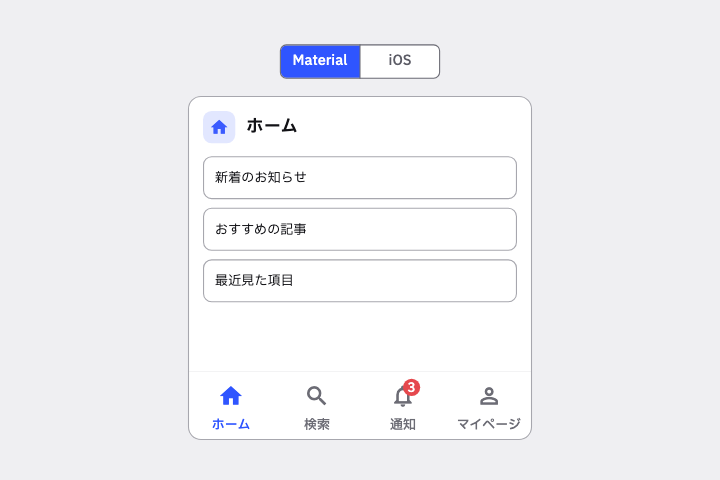
ホーム/検索/通知/マイページの 4 タブの Bottom Navigation Bar を作って。Material 3 の NavigationBar で、通知タブに未読数のバッジを出して。
# Bottom Navigation Bar / ボトムナビゲーション(下タブ)

- id: `bottom_navigation_bar`  URL: https://uizukan.dev/entry/bottom_navigation_bar/
- 種別: 表示 / Navigation
- 別名: Navigation Bar (M3), Tab Bar (iOS), Bottom Tabs, Bottom Nav
- 呼び名: Material 3=Navigation bar / Material 2=Bottom navigation / Android (Compose)=NavigationBar + NavigationBarItem / iOS (HIG)=Tab bars / SwiftUI=TabView / Web=<nav>(Bottom navigation) / Flutter=NavigationBar / BottomNavigationBar / CupertinoTabBar
- Flutter: `NavigationBar / BottomNavigationBar / CupertinoTabBar`
- 関連: navigation_rail, tab_bar, badge, scroll_to_hide_bar

**説明**: 画面最下部に固定され、アイコン+ラベルで主要セクションを切り替える。Material 3 では選択中のアイコンに pill 型のインジケータが付く。iOS では Tab Bar と呼ぶ。

**使いどころ**: 対等な 3〜5 個のトップレベル画面(ホーム/検索/通知/マイページ)。

**AI への伝え方(日本語)**: ホーム/検索/通知/マイページの 4 タブの Bottom Navigation Bar を作って。Material 3 の NavigationBar で、通知タブに未読数のバッジを出して。

**Prompt (English)**: Create a 4-tab Bottom Navigation Bar (Home / Search / Notifications / Profile) using Material 3 NavigationBar, with an unread-count badge on the Notifications tab.
詳細プロンプト は Pro
開発者向け Pro(準備中)で、AI が MCP から直接取りに行けるようになります。名前・デモ・プロンプト・Markdown は無料のままです。
Pro の案内を見る
Flutter コード は Pro
開発者向け Pro(準備中)で、AI が MCP から直接取りに行けるようになります。名前・デモ・プロンプト・Markdown は無料のままです。
Pro の案内を見る