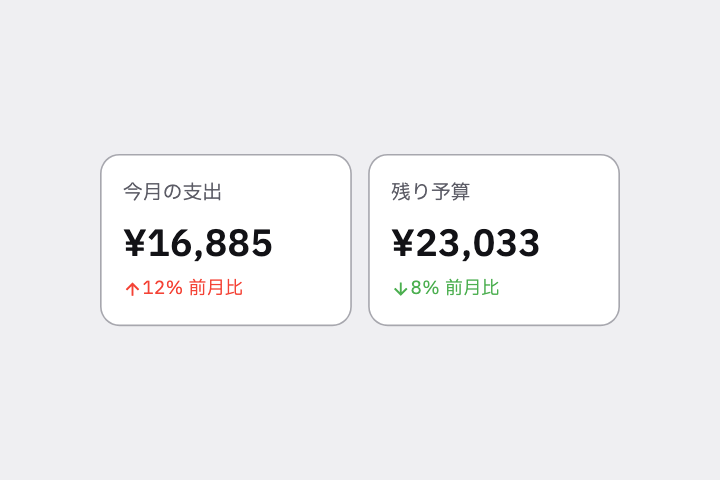
ホームの上部に Stat Tile を 2 つ横に並べて。「今月の支出」「残り予算」で、大きな数字の下に小さなラベル、右上に前月比の緑/赤の矢印。
# Stat Tile / 数値タイル(KPI カード)

- id: `stat_tile`  URL: https://uizukan.dev/entry/stat_tile/
- 種別: 表示 / Data Display
- 別名: KPI Card, Metric Card, Stat Card, Summary Tile
- 呼び名: Material 3=該当なし(Card で組む) / Material 2=該当なし(Card で組む) / Android (Compose)=該当なし(Card + Column) / iOS (HIG)=該当なし(Lockups / Widget が近い) / SwiftUI=該当なし(GroupBox / VStack で自作) / Web=該当なし(Stat card / KPI card) / Flutter=自作(Card + Column)
- Flutter: `自作(Card + Column)`
- 関連: card, animated_counter, linear_progress

**説明**: ダッシュボードの先頭で使う、数値を主役にした小さなカード。前期比の矢印や色で増減を示す。

**使いどころ**: ホーム画面のサマリー、家計簿・健康・学習アプリの実績表示。

**AI への伝え方(日本語)**: ホームの上部に Stat Tile を 2 つ横に並べて。「今月の支出」「残り予算」で、大きな数字の下に小さなラベル、右上に前月比の緑/赤の矢印。

**Prompt (English)**: Place two Stat Tiles side by side at the top of Home: "Spent this month" and "Remaining budget", a large number with a small label below and a green/red month-over-month arrow at the top-right.
詳細プロンプト は Pro
開発者向け Pro(準備中)で、AI が MCP から直接取りに行けるようになります。名前・デモ・プロンプト・Markdown は無料のままです。
Pro の案内を見る
Flutter コード は Pro
開発者向け Pro(準備中)で、AI が MCP から直接取りに行けるようになります。名前・デモ・プロンプト・Markdown は無料のままです。
Pro の案内を見る