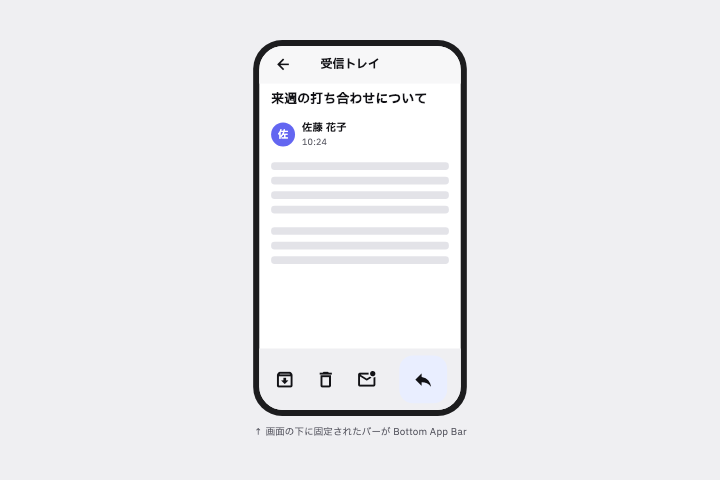
メール詳細画面の下部に、アーカイブ/削除/返信のアイコンと右端に FAB を持つ Bottom App Bar を作って。
# Bottom App Bar / ボトムアプリバー(下部ツールバー)

- id: `bottom_app_bar`  URL: https://uizukan.dev/entry/bottom_app_bar/
- 種別: 表示 / Navigation
- 別名: Bottom Toolbar, Toolbar (iOS), Action Bar
- 呼び名: Material 3=Bottom app bar / Material 2=Bottom app bar / Android (Compose)=BottomAppBar / iOS (HIG)=Toolbars(bottom) / SwiftUI=.toolbar { ToolbarItemGroup(placement: .bottomBar) } / Web=Toolbar(WAI-ARIA パターン)/ <footer> / Flutter=BottomAppBar
- Flutter: `BottomAppBar`
- 関連: fab, bottom_navigation_bar, bottom_action_bar

**説明**: タブではなく「この画面での操作」(削除・共有・返信など)を下部にまとめるバー。Material では FAB を右端に埋め込める。

**使いどころ**: メール詳細・写真閲覧など、画面固有のアクションが複数あるとき。

**AI への伝え方(日本語)**: メール詳細画面の下部に、アーカイブ/削除/返信のアイコンと右端に FAB を持つ Bottom App Bar を作って。

**Prompt (English)**: Add a Bottom App Bar to the email detail screen with archive / delete / reply icons and a FAB at the right end.
詳細プロンプト は Pro
開発者向け Pro(準備中)で、AI が MCP から直接取りに行けるようになります。名前・デモ・プロンプト・Markdown は無料のままです。
Pro の案内を見る
Flutter コード は Pro
開発者向け Pro(準備中)で、AI が MCP から直接取りに行けるようになります。名前・デモ・プロンプト・Markdown は無料のままです。
Pro の案内を見る